7 Essential Off‑Road App Features for Trail Discovery
The best off-road trip-planning and trail-navigation app should take you from first idea to final check-in without switching apps. Yes, one platform can handle trail discovery, ride planning, turn-by-turn guidance, and real-time check-ins, provided it combines expert-verified maps, legal-access layers, offline reliability, and collaborative tools. This guide breaks down the seven features to prioritize and shows how they work together on the trail. Whether you ride solo or in a group, look for deep trail catalogs, clear difficulty ratings, unlimited Waypoints, and cross-device sync. Pair those with land ownership data, safety and conditions layers, and in-vehicle integrations. With that toolkit in place, you can confidently discover, plan, navigate, and share every off-road adventure.
TL;DR: An all-in-one off-road app should take you from trail discovery to turn-by-turn navigation and real-time check-ins without bouncing between platforms. Prioritize seven essentials: offline maps, expert-verified trail and guidebook content, unlimited Waypoints and check-ins, turn-by-turn + route building, land ownership/legal access layers, safety and conditions overlays, and cross-device sync for easy collaboration. When these tools work together, you plan faster, avoid closures or trespass, stay safer off-grid, and keep everyone on the same route—whether you ride solo or with a group.
Essential Off-Road App Features
The ideal off-road GPS mapping app unifies satellite, topo, and rich trail data with tools for discovery, planning, navigation, and trip review. Riders value having everything in one place—offline navigation, real-time conditions, check-ins, land ownership overlays, and collaboration—so planning time goes down while safety and confidence go up.
Off-road trail discovery is finding, evaluating, and navigating new routes using verified maps, difficulty ratings, photos, and community reports to choose safe, legal lines. When evaluating apps, look for nationwide coverage, expert-curated content, and integrations designed for serious off-roaders, all anchored by highly accurate, purpose-built maps and features that span pre-ride to post-ride workflows (see the features overview).
- Why it’s essential: Consolidates your end-to-end workflow so plans, maps, and safety info stay consistent across planning, navigation, and post-ride review.
- Benefits: Faster planning, fewer app switches, better situational awareness, and shared context for groups.
- Risks if missing: Fragmented data, version drift between riders, higher chances of wrong turns, missed closures, and slower decision-making.
Offline Maps

Offline maps are downloadable map tiles and route data saved to your device so navigation continues even when you lose cell service. With a capable app, you can save areas before you go—bringing your custom adventure and all essential layers into no-signal zones—and continue recording tracks and following routes without interruption. Reviews can reveal whether downloads are fast and reliable; check recent app store feedback for offline performance details (see the App Store listing). Plan tiers often determine download limits, and a common model is one offline map on a free tier, with Premium and Elite providing unlimited downloads. In remote terrain, offline maps aren’t a convenience—they’re foundational to safe navigation, precise backtracking, and verifiable check-ins.
- Why it’s essential: Cell service is unreliable off-grid; you need full-fidelity maps and routes available 100% of the time.
- Benefits: Continuous navigation, reliable track recording, accurate check-ins, and faster reroutes when plans change.
- Risks if missing: Losing the route in no-service areas, navigation gaps at critical junctions, and compromised safety if you can’t confirm position.
Trail Discovery and Guidebook Content

Guidebook content means curated trail information—photos, difficulty ratings, descriptive notes, seasonal insights, and points of interest—so you can assess a route before committing. Strong apps offer deep coverage; for example, the onX Offroad app lists 650,000+ miles of off-road trails and catalogs 500,000 recreation points such as campsites, trailheads, and fuel stops, layered across 852 million acres of public land—an effective base for research. A typical workflow is simple:
- Search by vehicle type and area.
- Filter by off-road trail difficulty ratings, distance, and open/closed status.
- Open photo-rich descriptions, surface notes, and Waypoints to decide your route.
To understand difficulty in more detail, this guide to reading trail difficulty ratings explains color codes and factors like grade, obstacles, and exposure. Trail info evolves over time as experts and riders add updates—community feedback and submissions help keep data current and actionable, as riders frequently note in community discussions on Reddit.
- Why it’s essential: Previews let you match terrain to skill, vehicle, weather, and time window before you commit.
- Benefits: Better route selection, fewer surprises, faster go/no-go decisions, and safer pacing.
- Risks if missing: Picking trails beyond your capability, encountering closures mid-ride, and wasting daylight on unsuitable routes.
Waypoints and Check‑Ins
Waypoints are custom map markers for locations of interest—trailheads, hazards, water crossings, campsites, or recovery caches—while check-ins are quick logs or shares of your current position and status for group coordination and safety. Look for unlimited custom Waypoints and a broad icon set (e.g., ratings, obstacles, rock crawls) so your map stays organized and meaningful throughout a ride (a robust features overview can serve as an example of strong waypoint options).
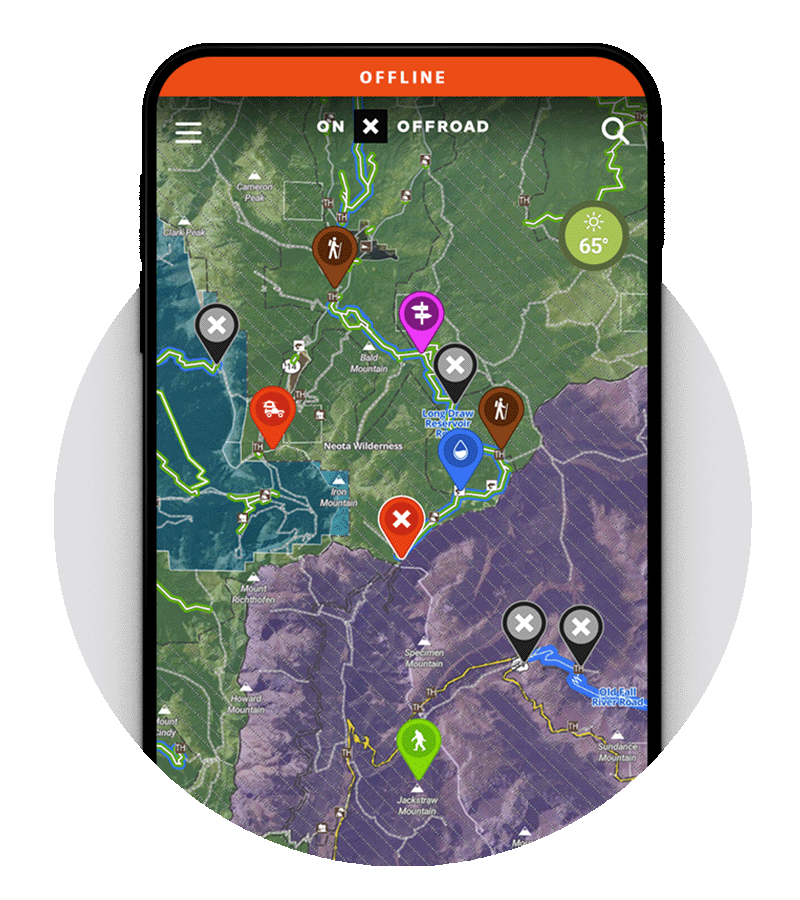
Practical uses:
- Flag key spots like staging areas, gates, fuel stops, and river fords.
- Capture Photo Waypoints to document obstacles or campsite conditions.
- Schedule check-ins during group rides; share location in emergencies.
Best practice: keep heavy Waypoint use tidy with Folders and consistent icon conventions to prevent map clutter and make group planning clearer.
- Why it’s essential: Precise, shared reference points keep teams aligned and speed decisions when conditions change.
- Benefits: Clear communication, faster regrouping, better documentation for future trips, and smoother logistics.
- Risks if missing: Confusion at junctions, missed hazards, slower emergency response, and disorganized group movement.
Turn‑by‑Turn Navigation and Route Builder
Turn-by-turn navigation provides live guidance on and off pavement, updating as you move and reducing trail anxiety at complex junctions. A capable Route Builder should snap lines to known roads and trails in a few taps, turning a rough idea into a precise plan without guesswork. On the trail, you want:
- Turn-by-turn guidance from highway to dirt, including off-grid travel.
- Apple CarPlay and Android Auto compatibility for hands-free, in-dash mapping.
- Offline routing on supported devices, so directions continue without service.
For teams, saving routes and syncing plans across devices streamlines pre-trip distribution, last-mile edits, and post-ride review—ensuring everyone arrives with the same plan and the same map data.
- Why it’s essential: Real-time guidance lowers cognitive load and keeps attention on terrain and conditions.
- Benefits: Fewer missed turns, safer junction decisions, smoother pace, and easier re-routing.
- Risks if missing: Backtracking, route drift on unofficial lines, increased fatigue, and elevated risk at complex intersections.
Private Land Boundaries and Ownership Information

Private Land Boundary Maps are map overlays that show property boundaries, ownership details, and regulations so you can confirm legal trail use and avoid trespass. Some apps include nationwide private land boundaries and owner information, while public land, USFS Motor Vehicle Use Maps (MVUMs), and vehicle-based filters help align your ride with legal access and seasonal rules. This reduces the risk of citations, closures, or conflicts and encourages responsible land stewardship.
Why it’s essential: Confident access decisions protect riders, landowners, and long-term trail availability.
- Benefits: Clear go/no-go calls, reduced conflict, better route compliance, and improved stewardship.
- Risks if missing: Accidental trespass, fines, confrontations, and potential trail closures from misuse.
Safety and Conditions Layers
Safety layers provide environmental context—conditions that influence traction, access, and decision-making—right on the map. Use them pre-ride and in the field to anticipate hazards and adjust plans early.
Key safety tools:
- Snowmobile trail map layers, avalanche forecasts, slope angle shading, and live weather.
- Wildfire activity and smoke mapping sourced from national fire and weather agencies.
- Cell Coverage Layer showing signal strength for Verizon, AT&T, and T‑Mobile.
- Trail Reports for user-submitted conditions, closures, and hazards.
- Dispersed Camping layers to identify legal, off-grid camping options.
Each of these layers helps you choose the right line, the right pace, and the right backup plan.
- Why it’s essential: Real-time and seasonal context turn a good plan into a safe plan.
- Benefits: Earlier hazard detection, better tire/gear choices, smarter timing, and fewer surprises.
- Risks if missing: Entering avalanche terrain unaware, getting boxed out by closures, smoke or weather exposure, and avoidable recoveries.
Cross-Device Sync and Collaboration
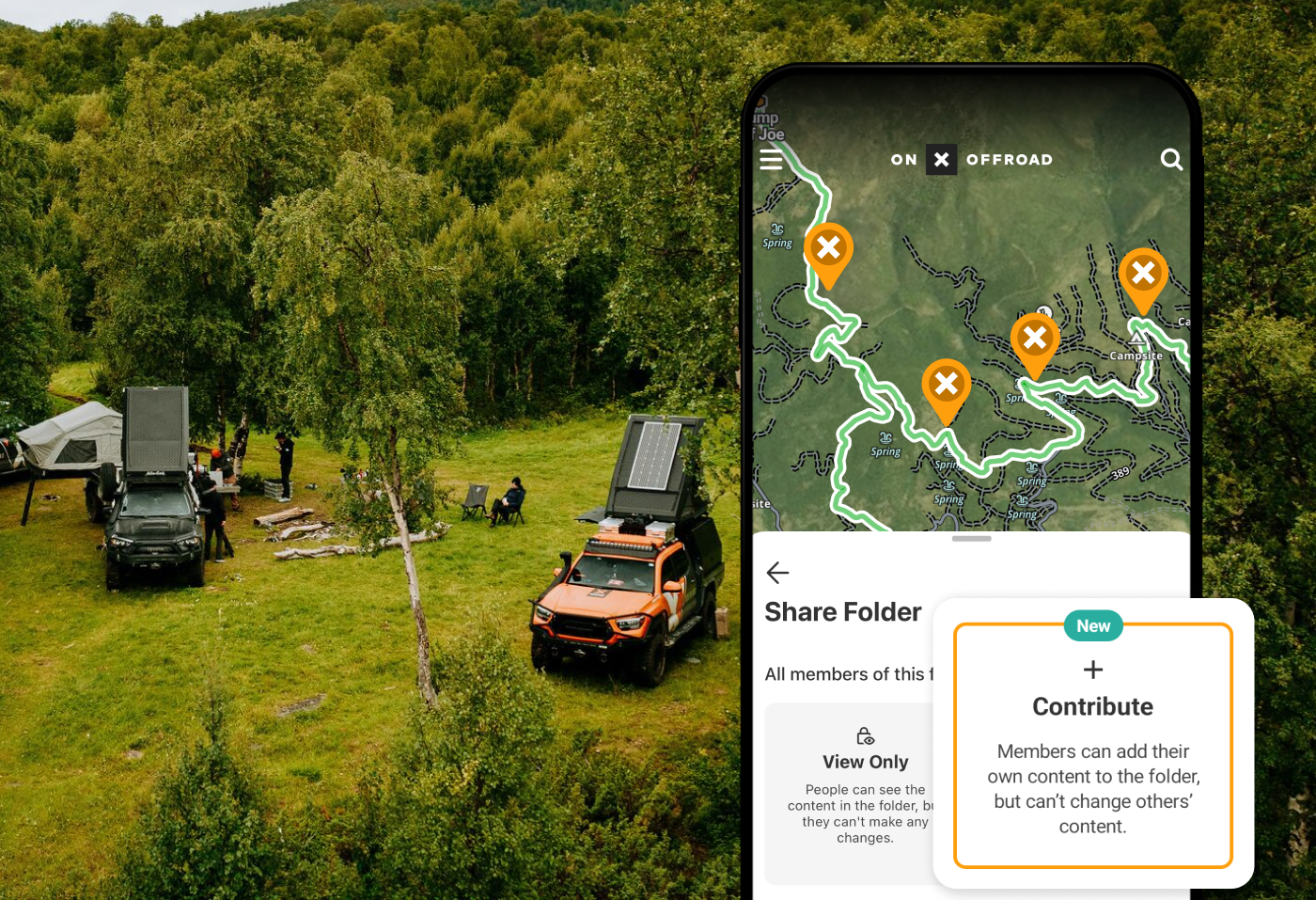
Cross-device sync means your maps, routes, tracks, and waypoints are saved to your account and available on phone, desktop, and compatible in-dash displays without exporting files. Collaborative Folders let teams co-plan rides by sharing waypoints and routes, assigning tasks, and consolidating updates in one place. Usability highlights include:
- Seamless switching between desktop planning, mobile exploration, and in-dash navigation.
- 3D Maps on supported devices for visualizing terrain, slope, and elevation changes.
- Post-ride track review to fine-tune future plans.
3D route planning renders the landscape in three dimensions so you can spot steep grades, exposure, and alternative lines before you commit—key for difficulty assessment and time estimates.
- Why it’s essential: Shared, synced data reduces confusion and ensures everyone sees the same plan.
- Benefits: Faster team coordination, fewer file transfers, consistent updates, and better after-action learning.
- Risks if missing: Version mismatches, outdated routes in the field, lost edits, and slower team decision cycles.
The Best All-in-One Off-Roading App: onX Offroad
If you want a single app that checks every box and then some, onX Offroad brings these capabilities together in one platform. With expert-verified trail maps, nationwide guidebook coverage, offline reliability, unlimited Waypoints and check-ins, turn-by-turn navigation with Route Builder, Apple CarPlay and Android Auto support, legal-access layers (including nationwide private land in Elite), safety and conditions overlays, 3D Maps, and cross‑device sync, it’s built for planning, navigating, and sharing every ride with confidence.
That depth, paired with accurate mapping and a steady cadence of improvements, is why onX Offroad is the best all‑in‑one app for off‑road adventurers looking for essential tools to go further, safer, and smarter. For a deeper look at how these features work together, see the onX Offroad features overview and the onX Offroad App page.
Not an onx offroad app user?
See what you are missing. Sign up today and find new trails with confidence.
FAQs
Offline Maps let you download detailed trail data, imagery, and points of interest so you can research, navigate, and record rides without cell service.
Apps combine expert ratings, color-coded difficulty scales, photos, and user reports to preview obstacles and share current conditions or closures.
Property boundaries and public/private overlays clarify where you can ride, helping prevent trespass and ensuring sustainable access.
Look for wildfire and smoke maps, avalanche and snow layers, cell coverage info, and live trail reports to plan safely in changing conditions.
Sync keeps your routes consistent across phone, desktop, and dash, while CarPlay and Android Auto make guidance hands-free and easy to follow on the trail. For an example of an all-in-one solution that brings these capabilities together, see onX Offroad.