
Frequently Asked Questions About onX Offroad
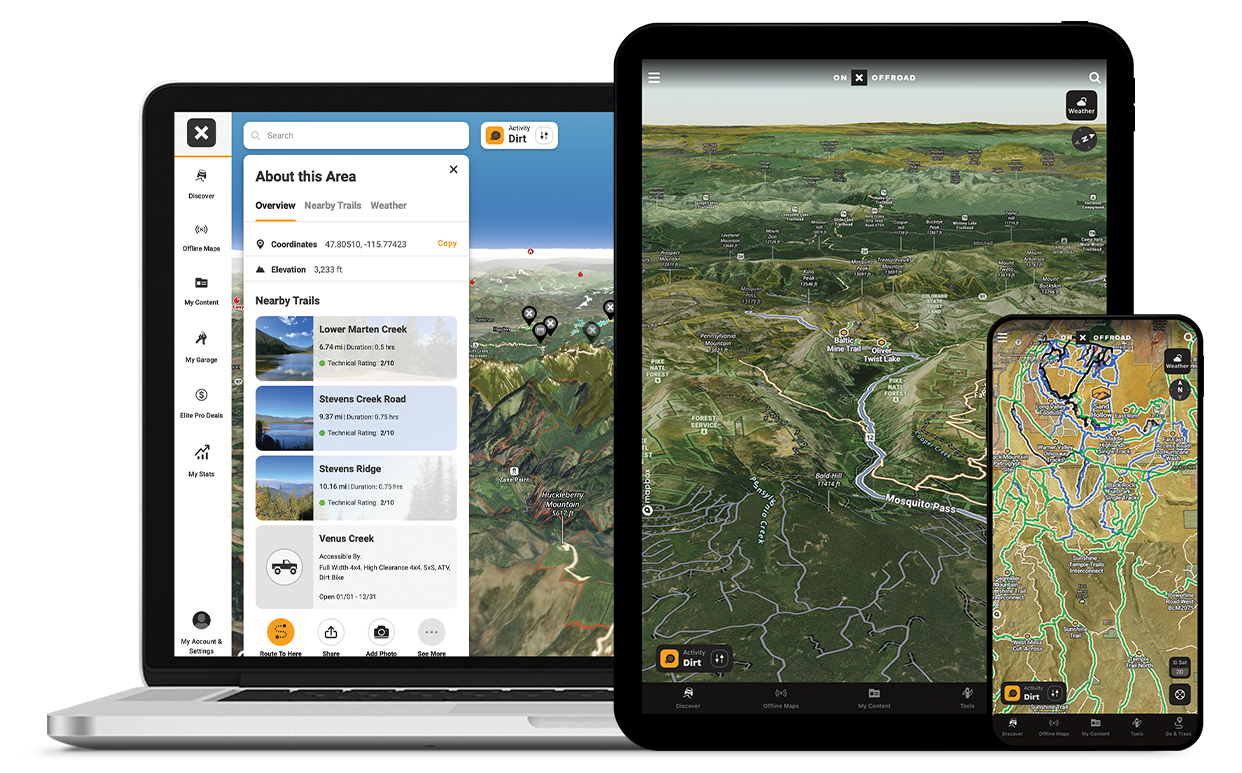
Explore Confidently With onX Offroad
Whether you’re driving trails in a Jeep, ATV, dirt bike, or overland rig, this guide answers the most common questions about the app’s features, trail data, offline maps, membership plans, and in-dash navigation support. Learn how to unlock 650K+ miles of trails, mark waypoints, and explore public and private land boundaries—all from your phone or vehicle dash.
onX Offroad is a GPS-based off-road mapping App tailored for off-road, powersports, and overlanding enthusiasts, offering access to over 650,000 miles of OHV trails, 3D maps, vehicle-specific filters, and recreation points like campgrounds and trailheads across the U.S., Canada, and Baja, Mexico.
You can download Offline Maps in advance to navigate even without cell service, drop and share Waypoints, and use tools like a Tracker to record your route, speed, distance, and time. onX Offroad also includes turn-by-turn navigation, supports in-dash systems like Android Auto and CarPlay, and offers additional features like Trail Difficulty Ratings and Motor Vehicle Use Maps (MVUMs) to help you plan and execute safe, informed off-road adventures.
Using onX Offroad is straightforward and powerful, whether you’re on mobile or desktop. You’ll find key tools in the app toolbar: Discover nearby off-road trails, track your route, and add customized Waypoints—then download Offline Maps to keep those customizations accessible even without cell service. Tap into additional information like trail difficulty ratings and land ownership details, plus, use turn-by-turn GPS navigation to plan and navigate your off-road adventures confidently.
Yes, onX Offroad offers a free version to download and use. The free version includes access to Satellite, Topo, and Hybrid basemaps, along with basic GPS features like tracking your trips and adding markups.
To access the full suite of off-roading tools—like highlighted open and closed trails, featured trail descriptions with photos, recreation points, and unlimited Offline Map downloads—you’ll need to upgrade to a paying subscription.
onX Offroad Premium delivers essential off‑road navigation features, including highlighted open and closed trails, featured routes with descriptions and photos, recreation points like campgrounds and trailheads, and unlimited Offline Maps—perfect for local trail exploration and GPS tracking adventures.
onX Offroad Elite includes everything in Premium, plus nationwide private land boundaries and landowner info, recent satellite imagery, and exclusive partner discounts on off‑road gear—designed for serious off‑roaders who travel widely or need access to private land details. If you want more details on the two memberships, see our blog onX Offroad Premium vs Elite.
onX Offroad Elite includes all Premium features—like open and closed trails, recreation points, dispersed camping maps, and offline maps—plus nationwide private land ownership boundaries, so you can identify property lines, landowner names, and potential access points across the U.S. It also unlocks Recent Imagery (aerial images updated every two weeks), and exclusive pro deals on gear and tools from top off-road brands like Rhino-Rack, ARB, and Factor 55. Elite is ideal for overlanders, off-roaders, and backcountry explorers who need advanced planning and land access tools.
onX Offroad Premium costs $34.99/year, and onX Offroad Elite is $99.99/year or $14.99/month. Both plans start with a 7-day free trial, and pricing includes access to GPS tools, unlimited Offline Maps, and trail data—with Elite adding private land ownership maps and extra features and gear discounts.
The free version of onX Offroad gives users access to Satellite, Topo, and Hybrid basemaps, along with the ability to add Waypoints, record tracks with the Tracker, and view their GPS location. However, it does not include trail data, Offline Maps, or land ownership layers.
The paid Premium version unlocks 650K+ miles of trails, featured routes with photos and difficulty ratings, recreation points, and unlimited Offline Maps. The Elite version adds nationwide private land boundaries, landowner names, recent satellite imagery, and exclusive off-road gear discounts.
Yes, onX Offroad works offline when you download maps in advance. You can access GPS location, saved trails, Waypoints, and Tracks even without cell service, making it ideal for remote backcountry riding or overlanding. Offline Maps include all visible features from your selected area, including land boundaries and trail data.
To download Offline Maps in onX Offroad, tap “Offline Maps” in the bottom toolbar, select “New Map,” then pan and zoom to the area you want to save. Choose your resolution (Low, Medium, or High), name your map, and hit “Save.” Your map will be available even without cell service.
Yes, onX Offroad Elite includes nationwide private land boundaries and property lines, along with landowner names and parcel sizes, so you can see where public land ends and private property begins. This is especially useful for respecting access rules while overlanding, hunting, or exploring backcountry routes.
Yes, onX Offroad offers turn-by-turn GPS navigation that lets you follow planned routes directly from your mobile device or in-dash display using Android Auto or Apple CarPlay. You can build custom routes with Route Builder, then get audio and visual directions for off-road trails, even offline with offline Maps.
Yes, onX Offroad offers Trail Reports that let users view up-to-date conditions such as Open, Temporarily Closed, or Obstructed trails, with details like mud, washouts, or obstacles. You can also submit your own trail report for Guided Trails.
Yes, with onX Offroad, you can share Waypoints, Tracks, Routes, and other custom map components via text, email, or link. You can also use “Share Nearby” to send data offline to nearby users, and collaborate in real-time using Shared Folders with view or contribute access for your crew.
Yes, with Route Builder, onX Offroad Elite users can create and save custom routes by snapping to mapped trails or drawing freeform lines. You can plan overlanding trips, connect trails, and follow routes with turn-by-turn navigation in the App or through Android Auto and CarPlay.
onX Offroad offers trails for a wide range of vehicle types, including 4x4s, dirt bikes, side-by-sides (UTVs), ATVs, overlanding rigs, snowmobiles, and full-size trucks. You can filter trails based on vehicle size, so only compatible routes appear on your map.
Yes, onX Offroad includes trail difficulty ratings on many Featured Trails, ranging from Easy to Moderate to Difficult, so you can choose routes that match your skill level and vehicle capabilities. These ratings are based on factors like terrain type, obstacles, and elevation, and they often include trail photos, descriptions, and user reports.
onX Offroad is one of the best free off-road map apps for discovering trails, tracking rides, and exploring terrain with Satellite, Topo, and Hybrid basemaps. While the free version limits access to advanced features like trail data and unlimited Offline Maps, it still lets you use GPS tracking, mark locations, and view your position without cell service.
To cancel your onX Offroad subscription, log into your account at onxmaps.com and go to My Account → Manage Membership → Cancel Membership. If you subscribed through the Apple App Store or Google Play, you’ll need to cancel directly through your device’s subscription settings. After canceling, your access remains active until the end of the billing cycle.
To cancel your onX Offroad 7-day free trial, go to the platform where you started it:
onXmaps.com: Log into your account → Manage Membership → Cancel Membership
Apple App Store: Go to Settings → Subscriptions → onX Offroad → Cancel
Google Play: Go to Play Store → Subscriptions → onX Offroad → Cancel
If you don’t cancel, your trial will automatically convert to a paid membership after 7 days.
To manage your onX Offroad subscription, log into your account at onxmaps.com and navigate to My Account → Manage Membership. From there, you can upgrade, downgrade, cancel, or update billing info. If you subscribed via the App Store or Google Play, you’ll need to manage your subscription through your device settings.
To upgrade from Premium to Elite in onX Offroad, log into your account at onxmaps.com, go to My Account → Manage Membership, and select Upgrade to Elite. If you subscribed through the App Store or Google Play, open your device’s subscription settings to change your plan. Your Elite access will begin immediately, and your billing will adjust accordingly.
You can also easily upgrade your account here.
Yes — onX Offroad is fully available in Canada, offering extensive support for motorized trails, offline maps, GPS tracking, and more across the country. With an Elite membership, Canadian users gain access to trail maps, 3D terrain, public land boundaries (government, provincial, parks), and powerful planning tools such as Route Builder, Tracker, Waypoints, and Collaborative Folders.
You can explore trails by province—such as British Columbia, Ontario, Québec, and others—with details like difficulty ratings, trail conditions, and seasonality built into each trail guide.
Yes, onX Offroad supports Android Auto, allowing you to view trails, Waypoints, Tracks, and basemaps directly on your vehicle’s dashboard screen. With an Elite membership, you can follow turn-by-turn navigation for custom routes built with Route Builder. Offline maps and GPS location tracking also work through Android Auto, so you can stay on course even without service.
Yes, onX Offroad is compatible with Apple CarPlay, giving you in-dash access to trails, GPS location, Waypoints, Tracks, and basemaps on your dashboard. With an Elite membership, you can also use turn-by-turn navigation for custom-built routes, making it easy to follow mapped trails directly from your vehicle’s display—even offline (with Offline Maps).