
Collaborative Folders:
Build the Plan Together
Collaborative Folders help you and your crew organize your hunt plan and stay aligned when you’re deep in the backcountry. Add your own intel, invite others to contribute, and stay dialed all season long.
One Folder. One Strategy.
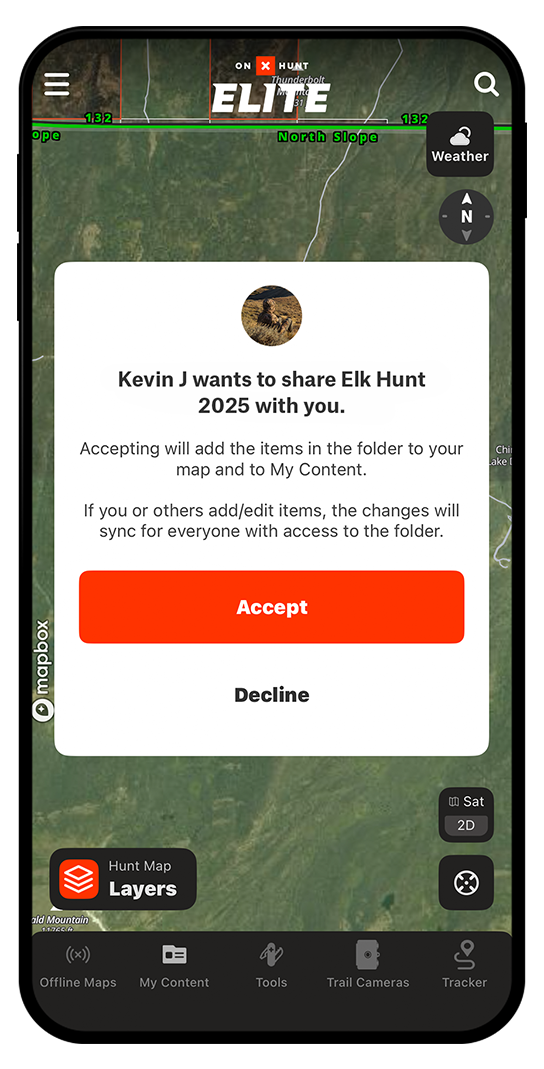
Build, share, and sync your hunt plan with your crew. Drop in Waypoints, Tracks, Lines, Routes, and Areas, then choose who can contribute vs. who can view only.
No crossed wires, no duplicated efforts—and it’s all accessible offline. From pre-season scouting to closing the distance, your group is working off the same game plan.

Less Chaos, More Clarity
When you’re planning a hunt with buddies, it’s easy for things to get scattered—screenshots in one thread, dropped pins in another, and GPS coordinates buried somewhere in between. Collaborative Folders give you one clean place to build the plan together and stay organized through real-time updates as your crew adds intel to the map throughout the season.
Share the Game Plan, But Stay In Command
As the owner of a Collaborative Folder, you decide who can contribute vs. who just sees the plan. Add and remove people anytime, adjust access roles, and manage content. Your folder, your rules.

Switch Strategies Without Slowing Down
Create as many folders as you need—one for each hunt, or multiple contingency plans for the same tag. Collaborative Folders keep your playbooks separate and organized so there’s no confusion about which plan everyone should follow. You can also “hide” or “show” folders to keep your map clean when it’s time to pivot.

Create Your Crew’s Hunt Journal
Over time, your Collaborative Folders become your crew’s long-term memory. Years of stalks, dropped packs, and downed animal pins—all always available for the group to look back on—translate into richer memories and stronger strategies for the next “hey, guess which tag I drew” text.
I got to test out Collaborative Folders while e-scouting with my hunting partners for a big fall hunt coming up—and it’s one of my new favorite features. Instead of texting pins or screenshots back and forth, we’re all dropping Waypoints, camp locations, and routes into one shared folder in the Hunt App. It’s made our prep way more efficient. If you’re planning a hunt with buddies, this is the way to do it.
– Casey, HUSHIN
Plan With Confidence. Hunt With Clarity.
Start your free trial and use Collaborative Folders to coordinate with your crew.
Frequently Asked Questions
Yes. When you share a Folder, you can set the Folder to Contribute or choose View-Only. If you want to adjust individual permissions, go to the Folder you want to adjust. Select “Manage Access”, which can be found under the three dots button, or the right arrow on mobile.
No. They will only see what you add to the Folder you shared with them. They also can’t change any content that you add to the Folder.
Your markups are never lost. They remain in your account, even if the Folder is removed.
You need a Premium or Elite Membership to share or contribute to a Folder.
Click “My Content” in the toolbar, select the Folder you want to share, and then click the “Share” button at the bottom. From here, you can set the folder to Contribute or choose View-Only. Don’t worry; you can adjust permissions at any time. Lastly, text or email the link to anyone you want to collaborate with on the Folder.