
Fishing Satellite Imagery
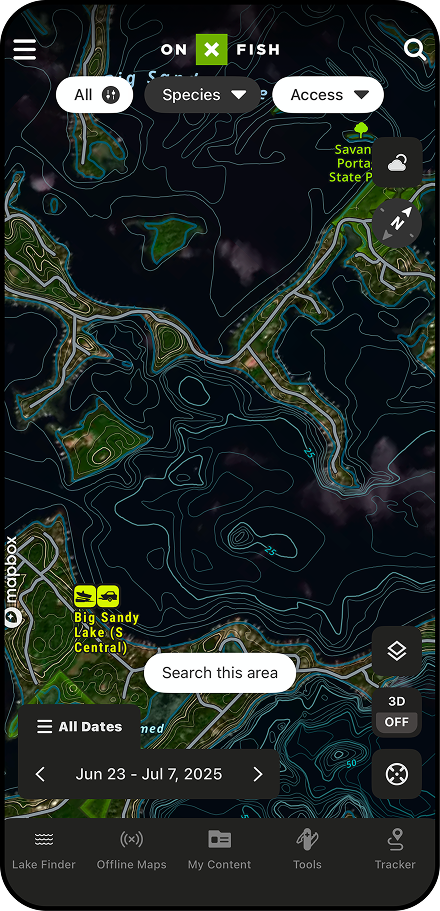
One of onX Fish’s standout features is its access to recent satellite imagery. In open-water season, this showcases current water levels, vegetation growth, and weed lines. During the early ice season, Recent Imagery can reveal information about ice development and overall safety, and inform anglers on fishing pressure. Use this feature to stay up to speed on your favorite lake’s conditions.
One of onX Fish’s standout features is its access to recent satellite imagery. In open-water season, this showcases current water levels, vegetation growth, and weed lines. During the early ice season, Recent Imagery can reveal information about ice development and overall safety, and inform anglers on fishing pressure. Use this feature to stay up to speed on your favorite lake’s conditions.
See Fishing Pressure From a Bird’s Eye View
Make the most of your time on the water with key onX Fish features such as:
- Find the Right Water Faster: Use Premium Filters like Trophy, Keeper, and Abundance along with species insights to quickly identify lakes that match your fishing goals.
- Break Down Water Before You Launch: High-quality and recent imagery help anglers identify structure, depth changes, and key fish-holding areas so you can start with high-percentage spots. Pair Recent Imagery with 3D fishing maps to connect surface clues with underwater structure, depth changes, and high-percentage fishing areas.
- Adapt to Conditions in Real Time: Map overlays such as wind and radar help anglers anticipate changing weather and adjust plans quickly while on the water.
Undisturbed Areas: Conversely, imagery can highlight untouched sections of a lake where fish may be easier to catch.
Pair Recent Imagery with Area Insights by Fishing Hotspots to identify vegetation, hazards, seasonal fish movement, and high-percentage zones before you launch.
Joel Nelson
Owner/Operator of Joel Nelson Outdoors
“We know the same lakes in topographic depressions, that are shallower, and are north enough to get the cold weather will build ice first, every year. Even before ice-up, I’ve been using onX Fish to scout which lakes will be “live” before others. I can’t wait for people to start driving on the ice so I can use recent imagery to see where I should and shouldn’t be spending my time fishing this winter.”
Have the Advantage This Summer
Try onX Fish free for 7 days. Find the right water faster, scout structure before you launch, and fish smarter with powerful map tools.
How To Use Recent Imagery
In App
- Open the onX Fish: Midwest App on your mobile device.
- Click “Layers” button in the bottom right portion of the screen.
- Select “Hybrid” or “Aerial” to select imagery background.
- Click “Recent Imagery” to change basemap from “High Quality.”
On Desktop
- Log in to your account.
- Click “Layers” button in the bottom right portion of the screen.
- Select “Hybrid” or “Aerial” to select the imagery background.
- Click “Recent Imagery” to change basemap from “High Quality.”
See other onX Fish App features, like Trophy Fish and Keeper Potential or Species Abundance Insights.
FAQs
Recent Imagery provides updated satellite images that help anglers identify structure, depth changes, and key fish-holding areas before launching. It also helps reveal fishing pressure and undisturbed sections of a lake.
Open the app, tap the “Layers” button in the bottom right, select “Hybrid” or “Aerial” as your imagery background, then tap “Recent Imagery” to switch from the default “High Quality” basemap.
Yes, log in to your account at webmap.onxmaps.com/fish, click the “Layers” button, select “Hybrid” or “Aerial,” and then click “Recent Imagery” to update the basemap.
Recent Imagery lets you scout which lakes are developing ice before others, and once anglers are on the ice, you can see where fishing pressure is concentrated to find less pressured spots.
Yes, the imagery can reveal both high-traffic areas and undisturbed sections of a lake, helping you decide where to spend your time on the water.
Yes, onX Fish offers a 7-day free trial that gives you access to Recent Imagery and other powerful map tools to help you find the right water faster.